

What is S+?
Because no sports-betting supplier named S+ could be confirmed from an official source, this page records only what the DINO card presents. The card logo is a silver sphere overlaid with a red S and a small red plus sign, and DINO's label is likewise just S+. The internal path DINO uses to open the card reveals no supplier name, so no company details are inferred.
Finding S+ on DINO
As seen in the DINO lobby on 2026-09-19 · Pressing the card opens the login screen; the lobby opens after login.
Checked on 2026-09-19, the S+ card is the third card visible in the first sportsbook row and holds lobby position 4. A basketball player stands on the right over a night-time stadium background, with the small S+ logo in the upper-left corner. Clicking while logged out goes to /login with a refererURI parameter, so nothing beyond the card can be examined at that stage.
Logged in on 2026-09-19, pressing the card loaded the lobby page on the 442hattrick.com domain (/ko/view-4). DINO's own notice labels this lobby '에스플러스(S+)'.
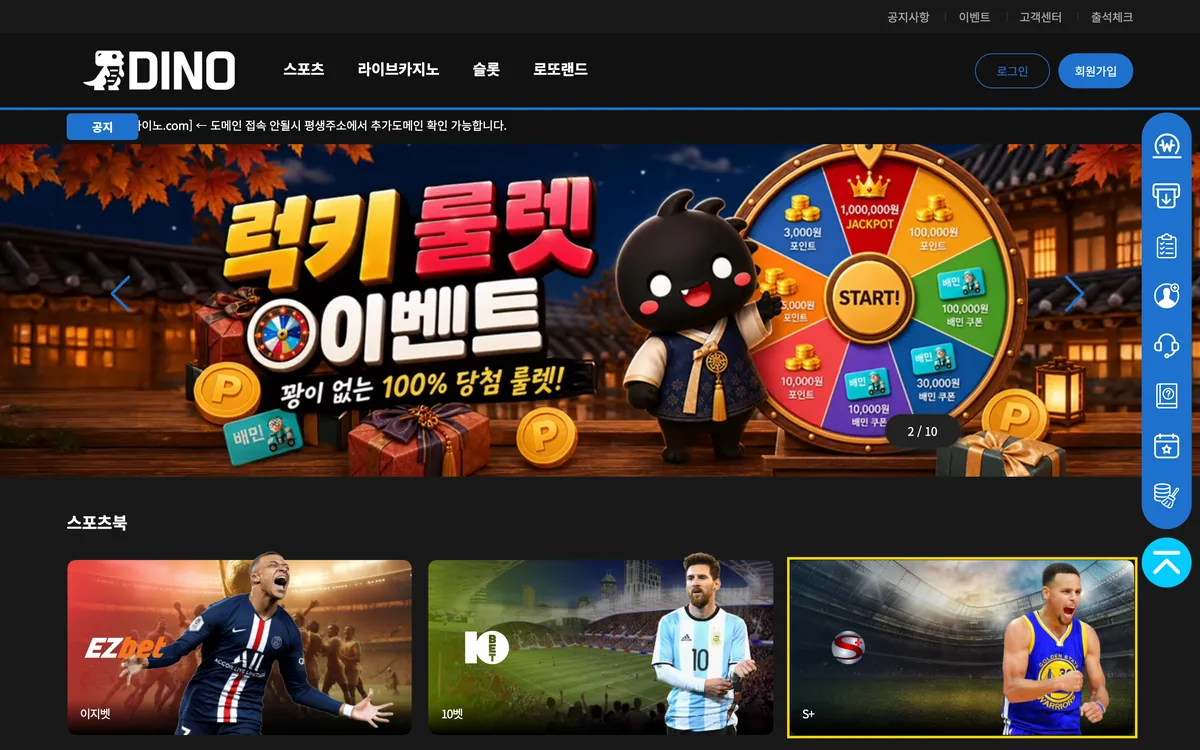
S+ categories available on DINO
- Sportsbook — #3
- Lobby position 4 in the DINO sportsbook area, third card in the first row
- Both the logo and the label read S+
- Click leads to the login screen; no game-list window
- No official supplier source verified
Content seen on DINO
The S+ sports and match list exists only in the lobby that opens after login, so nothing from it was confirmed while logged out.
Interface and usage notes
Like the other sportsbook cards, S+ switches to the login page the moment it is clicked and has no search field or list window of its own.
S+ on mobile

On the mobile card (390px) the silver sphere logo sits large in the centre of the stadium background, the player image is absent, and only the S+ label appears in the lower-left corner.
Sources and verification scope
Company facts are stated only as far as the official sources below confirm them. Items absent from the pages we checked (founding year, headquarters, etc.) are left blank, and DINO lobby observations describe the logged-out screen on the stated date. Products presented on the provider's official site and games actually seen in the DINO lobby are kept in separate sections.
No official company site could be verified for this provider. The information above is limited to what the DINO lobby card shows.
DINO lobby observation: dino-333.com/main on 2026-09-19, logged out.